Bye bye caps-lock
Breaking up is never easy I know, but I have to go.
~Benny Andersson, Björn Ulvaeus and Stig Anderson: Knowing Me, Knowing You (ABBA)
I fairly recently stumbled across Practical
Vim by Drew
Neil. Which I found via the Changelog Podcast episode on
Vim. A true gem, and a genius way to
introduce the more advanced concepts of vim in a practical manner. As Tim
Pope (vim-guru behind legendary plugins as
vim-sensible, vim-surround and vim-fugitive) mentions in the foreword,
the tip setup felt a little beneath him, but it turns out it’s a cookbook to
mastery!
I was first seriously introduced to vim as a code editor when I studied at Cal Poly back in 2017. Safe to say I was not intrigued. It felt clunky, over-engineered and inaccessible. But for some reason I couldn’t quite drop it. Seeing my friend Hannes Elvemyr use it as his primary front-end IDE made me see more of the appeal.
But it wasn’t until I started at SEB and saw a couple of guys use it as their
home tool since way back that I really started considering it. Becoming more and
more familiar with bash in my day2day operations, and wanting to hang out
more and more in the terminal triggered some thinking. Startup times and
bloated IDEs was the straw that broke the camels back. During holiday season
late 2020 I spent a full week getting a sensible vim-setup from ground up,
introducing only the changes in my .vimrc that I understood (along with
Windows Terminal and
tmux). And it paid off! Couldn’t be
happier with my terminal-centric setup, keeping close to the shell at all times
possible.
Anyways. Back to the main storyline. In the book, one of the fairly early tips
is to do something as bold as this. Quit your Caps Lock! (Should even make that
into merch! QYCL!). Couldn’t believe my eyes when I saw it. So bold! This guy
has been around on my keyboard forever! But still, just like vim originally
didn’t really entice me, the
inception
(and no, Inception != Recursion!) quickly became a fact. And one day I decided
to just go for it.
The change is marvelous! I can’t believe I’ve been walking in the dark for so long! A brave new world – sticking close to the Home row at all times has been a real gamechanger!
If you want to have at it, the way to do it in Windows is here (and it’s of course fairly messy).
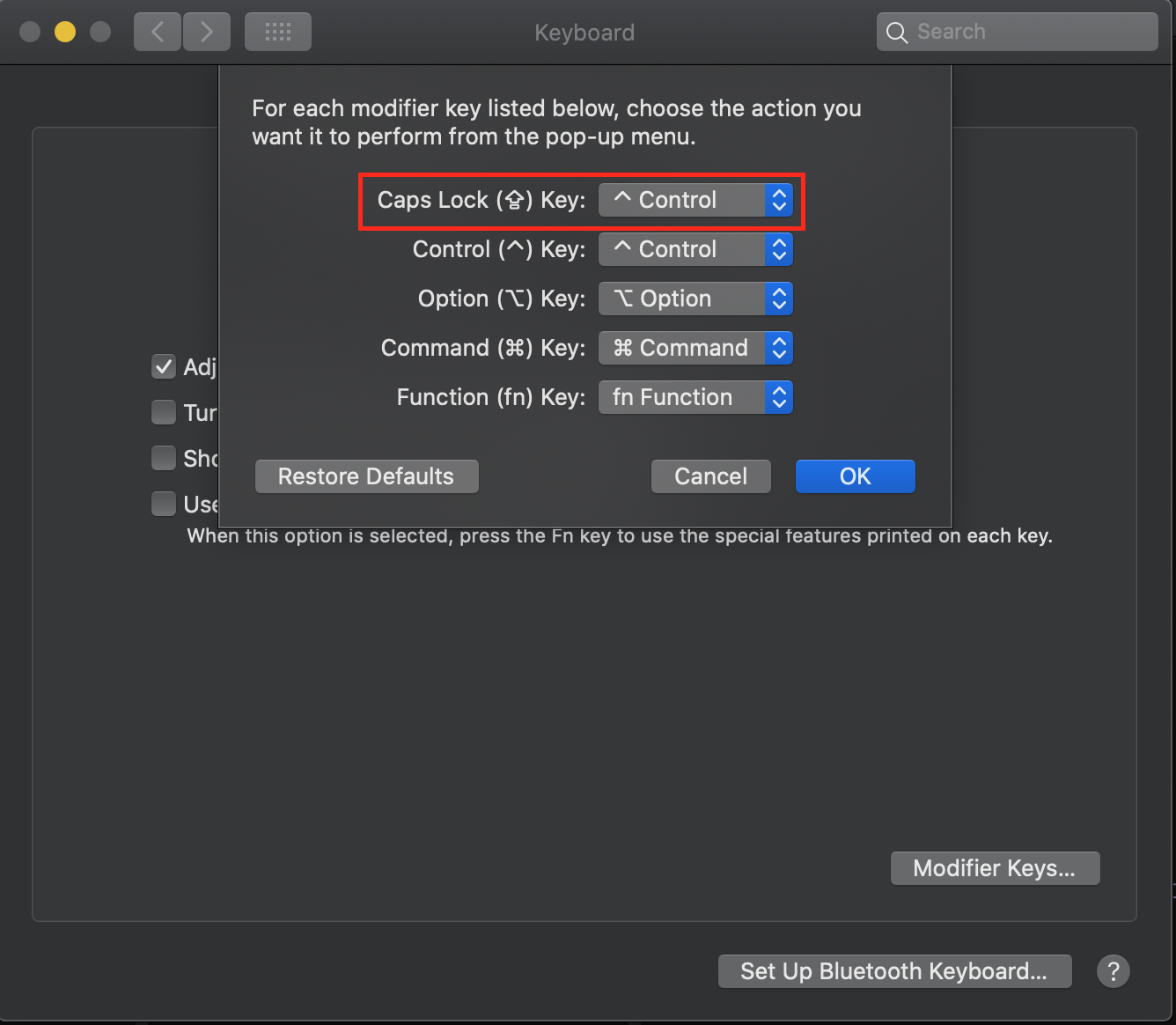
In Mac, just open Preferences -> Keyboard and see the image at the top of this post. Quick as a brick, and you won’t miss that old ex even a little bit!